
OnlyFans free pages attract millions of browsers who want to sample content before committing money. BestOnlyFans readers often ask how to explore these zero-cost accounts without exposing payment details, contact data, or browsing habits. The answer is a repeatable routine: verify once, isolate devices, control notifications, and audit your portfolio on a schedule. BestOnlyFans refreshes its rankings every month.
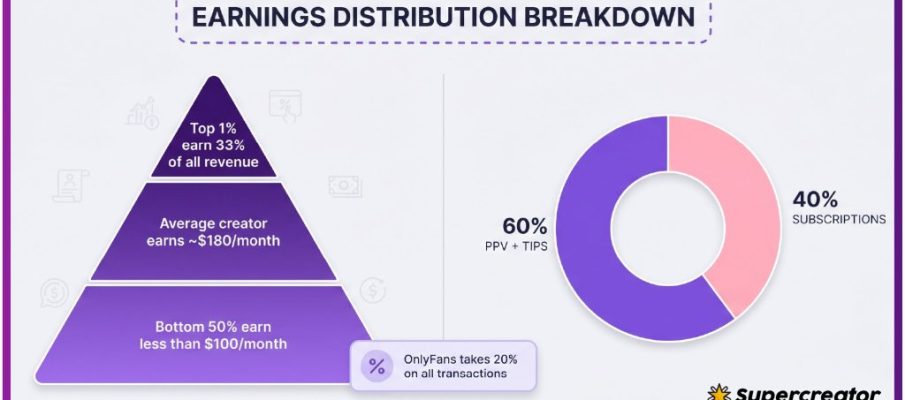
Free pages set the subscription price to $0 and earn through pay-per-view (PPV) messages and tips instead. That model changes the risk picture. You are not risking a monthly fee, but you are still handing over a card for the $0.10 verification hold, an email address, and a stream of behavioral data.

Unique Risk Profile of Free-Page Exploration
A paid subscription forces a decision. Free pages remove that friction entirely, so the same user who would follow two paid accounts may follow twenty free ones in a month. Each follow adds a verification event, a notification channel, and a small amount of behavioral data attached to your account.
The compounding effect is the real problem. One signup is harmless. Twenty signups create a pattern that can be correlated across pages, and the sheer volume of alerts makes it harder to notice the one message that actually matters. Per-page scrutiny also drops as portfolios grow, because nobody reads terms carefully at the fifteenth follow.
| Risk Factor | Free Page Impact | Mitigation Priority |
|---|---|---|
| Portfolio size encouragement | Zero cost removes the natural brake on follow count | High |
| Cumulative verification exposure | Every signup places a $0.10 hold on a card | High |
| Notification volume | Many accounts compete for the same attention channel | Medium |
| Per-page scrutiny decline | Rushed signups skip profile and history checks | Medium |
| External discovery dependency | No built-in directory means third-party ranking sites drive traffic | Medium |
That single design fact explains why ranking sites, link lists, and social threads exist at all. It also means your entry point to most free pages is an external page you did not choose carefully, which is where the phishing and impersonation risk concentrates.

Payment Verification Hold Management
The $0.10 card verification hold is the most misunderstood part of free-page browsing. It is not a charge. It is a temporary authorization that confirms the card is valid, and it is refunded within days. Most confusion comes from users who never track it and then spot an unfamiliar line item weeks later.
- Use a single designated card for every free-page verification instead of spreading signups across multiple cards.
- Log each signup date alongside the expected refund date in a simple note or spreadsheet.
- Verify the refund posted within three to seven days.
- Dispute any hold that remains past ten days with your card issuer.
- Consider a virtual card with a low balance for additional isolation between your main accounts and platform signups.
If that single card ever shows a charge you did not authorize, you know exactly where to look and which signups to review.
Track verification holds the same way you would track a subscription trial. A hold you cannot account for is either a slow refund or a sign that the card number moved somewhere you did not intend.

Device and Browser Isolation Strategies
Cookies, local storage, and session tokens link activity on the same browser profile. Splitting accounts across isolated contexts keeps the platform from assembling one continuous picture of your habits.
- Standard: a dedicated browser profile with its own cookies, separate from your daily browsing.
- Enhanced: a container tab per account with isolated storage, useful when you want several logins in one window.
- Maximum: a separate browser installation or a virtual machine for high-volume exploration.
- Mobile companion: a dedicated app instance where supported, otherwise a separate browser app reserved for these logins.
| Isolation Level | Setup Effort | Protection Scope |
|---|---|---|
| Standard browser profile | Low, minutes | Separates cookies and sessions from daily browsing |
| Container tabs | Low to moderate | Isolates storage per account within one browser |
| Separate browser installation | Moderate | Full profile separation plus independent extensions |
| Virtual machine | High | Strongest separation for payment data and notifications |
Mobile deserves its own note. Phones mix app notifications, autofill, and keystore credentials in ways desktop browsers do not. If you monitor free pages on a phone, treat the app and the browser as two distinct environments and keep payment autofill out of both.
Two-step authentication belongs on every account you intend to keep, regardless of whether the page charges anything.

Notification Hygiene Across Multiple Free Follows
PPV messages unlock up to $50, paid chat commonly runs $3 to $5 per message, and tips can reach $100. None of that is a problem until twenty accounts are pushing alerts at once and the urgent ones get buried. Selective enabling is the fix. Turn on push notifications for a small number of pages you follow closely, and leave the rest on in-app alerts only.
The volume drop is immediate, and your attention goes where you decided it should go. Digest habits help too. Checking messages at fixed times rather than reacting to every buzz prevents promotional pressure from setting your spending pace. If a page cannot wait until your chosen check-in window, it was probably designed to rush a decision.
Alert thresholds are one guardrail. A daily message cap is another, and setting one means promotional PPV pushes cannot quietly redefine what you consider normal spending. The same logic applies to notifications: a page that ignores a quiet setting is telling you how it plans to treat your attention.
Cross-Page Behavior Pattern Protection
Interacting with every page at the same hour every evening creates a schedule that is easy to model. Spacing signups temporally is the simplest countermeasure. Vary the times you open the app instead of locking into a routine. Avoid predictable sequences like opening the same five pages in the same order during the same session.
If you use ranking resources to find pages, read how the list was built before trusting it. Our own BestOnlyFans methodology scores pages on verification signals, posting consistency, and pricing transparency rather than raw follower counts, and any list worth using should explain its criteria the same way. Curiosity-driven browsing also leaks intent. A free onlyfans profile viewer can preview public profile details without a signup, which keeps low-interest checks out of your account’s follow history entirely.
Recognizing and Exiting Suspicious Free Pages
The warning signs cluster around payment pressure and content promises that change after the follow. Exit early rather than negotiating with a page that already broke a norm.
- A first message demands payment off the platform, which no legitimate account needs to do.
- A PPV unlock price exceeds the $50 platform maximum, indicating external redirection.
- Content samples disappear after signup while messages asking for money increase.
- The creator name or handle changes without explanation.
- Message frequency exceeds five promotional PPV pushes per day.
Off-platform payment requests are the clearest signal, and they connect directly to phishing patterns documented well outside this platform. Once a conversation leaves the site, you lose the payment trail, the dispute path, and any meaningful account protection.
Handle changes deserve attention because they can indicate an account was sold, reused, or renamed after building a history. If the page you followed no longer matches the page you are reading, unfollow and document what changed.

Incident Response for Compromised Free-Page Interactions
Something has gone wrong: an odd charge, a phishing message, or account activity you do not recognize. Speed matters less than order. Work the sequence and keep records at every step, because disputes are won with documentation rather than recollection.
- Screenshot the suspicious content and any related charge.
- Change your OnlyFans password immediately.
- Revoke all active sessions from account settings.
- Notify your card issuer if an unauthorized charge is confirmed.
- Submit a platform report with the screenshots attached.
- Monitor the account for fourteen days for further anomalies.
- Consider card replacement if phishing is suspected to have captured full card details.
Documentation matters because card issuers ask for specifics: date, amount, merchant descriptor, and what you did after noticing. Write those details down while the timeline is still fresh, and keep the screenshots in one folder.
If you reused the same password on other sites, change those too. Credential reuse turns a single compromised login into a chain of access attempts you will spend weeks cleaning up.
Periodic Security Audits for Free-Page Portfolios
It needs to be consistent, written down, and honest about which follows stopped being worth the attention.
- List every active free follow and the date you joined.
- Note any page that changed from free to a paid price, and decide whether to stay.
- Verify payment methods on file are still valid and still intended for this use.
- Check for unfollowed pages that continue sending notifications.
- Review total PPV spend per page since the last audit.
- Document each decision to maintain or remove a follow.
When a creator raises the price, auto-renew stops automatically and existing access lasts only until the paid period ends. If you never revisit old follows, you can lose access without noticing and assume the account simply went quiet.

The platform has grown from a niche site into a mainstream one, and free pages now sit alongside the paid tier as a normal entry point. The same discipline that protects a paid subscriber protects a free-page browser, with one addition: because entry costs nothing, the decision to follow is the only filter you have. Make it deliberately.
FAQ
Do I need a different payment method for every free OnlyFans page I follow?
A single card keeps verification holds visible in one statement, and a virtual card with a low balance adds isolation if you prefer not to expose a primary account.
How can I tell if a $0.10 verification hold failed to refund properly?
Check your statement against your signup log. Holds normally reverse within days. If one is still present after ten days, contact your card issuer with the signup date and the amount, and note which page triggered it so the record stays complete.
Should I use a VPN when browsing free OnlyFans pages?
A VPN shifts your network address but does not isolate cookies, logins, or payment data, so it is not a substitute for browser profile separation. Use it for network privacy if you want it, and handle account-level isolation separately.
What are the warning signs that a free page may be a scam or impersonation?
Off-platform payment requests, PPV prices above the $50 maximum, content samples vanishing after signup, unexplained handle changes, and heavy daily promotional messaging.